

Images above (left to right) Martha Stewart, Design Editor, and A Beautiful Mess
Well, another thing for the home, but I promise this is more of a designy-crafty-DIY type of a thing than home renovations. I’ve been seeing these large Debbie Carlos prints around for years, online and at renegade. I learned that blowing up your own pictures really big can make for some great artwork from all my years watching early Trading Spaces. A year or so ago people started posting about how you can get your own images blown up, in black and white, cheaply at copy stores, by just asking for blueprint or engineering copies. Brilliant! Now, with a Leonardo AI video generator, you can take that creativity a step further, turning your images into eye-catching videos that showcase your artwork in dynamic, engaging ways.

Then a little bit ago I saw this great pin about making a life size photobooth strip from Today’s Creative Blog. I think that tutorial just pieced together 12×12 prints to look like they were all one strip, but I thought “why not take it a step further and just blow up a real photo booth strip?” I called up a local copy store and they said the largest size they print is 4’x3′ for only $5. The print is like a very large xerox and the paper is pretty similar weight to a nice copy machine paper. 4’x3′ is much wider than just one strip so I figured why not do a few strips side by side.
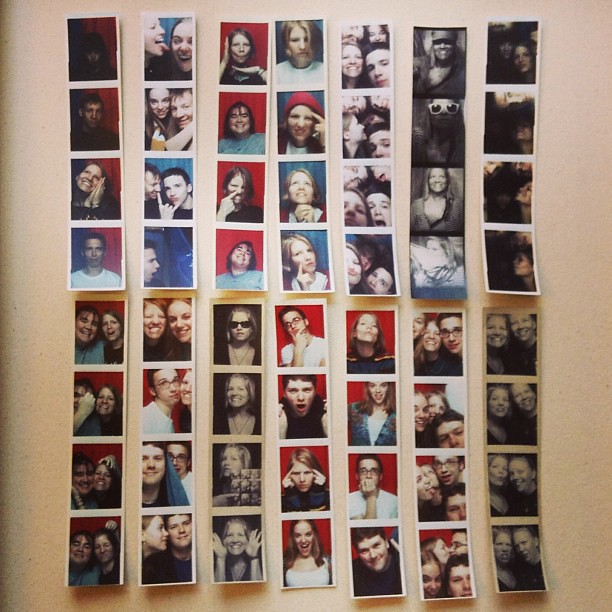
just a few of my photo chemical photobooth pictures strips
While looking through my strips I realized I liked some pictures from a lot of the different strips and decided to piece together some of my favorites of Matt and I from over the years. I scanned 3 photobooth strips to get the background right, and then scanned all my strips for the individual pictures I wanted to place over the existing pictures. They are all real photobooth pictures, just not from the same strips. You could easily just scan complete strips and have them printed as is.
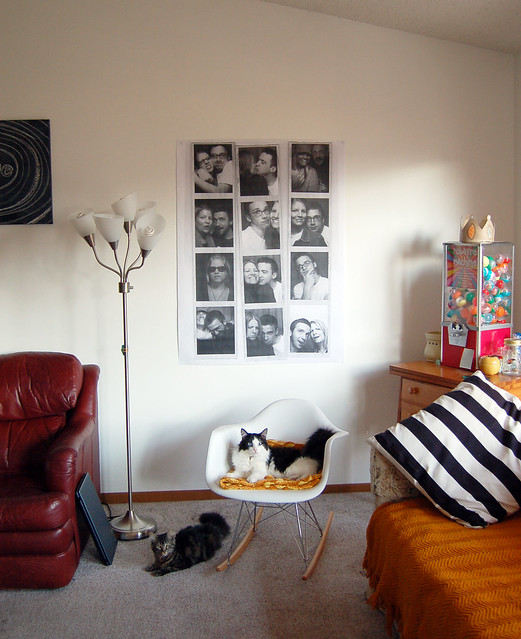
Once again, I’m not a home decor photographer, but COME ON! Look how I was able to get two adorable kitties in the shot AND both are looking at the camera! I may have missed my calling to be a pet photographer. It’s like a family portrait of sorts above. Matt and I in the print, and the cats below. I said “too bad I didn’t remove the laptop from next to the couch” and Matt said “well, that’s part of the family too!”
A few extra ideas I had while doing this project:
I scanned the photobooth strips in at resolution of 1200 so that when they were printed out that huge they would still look pretty crisp.
The print is just stuck to the wall using wall tacky, which I’m not crazy about for the long run. I doubt I’d just find any picture frame that large that is in range for a $5 print. I need to look online on sites like https://www.secretasianman.com/best-canvas-prints/ for some framing ideas.
Think about what else you could print large. What about a face, Chuck Close style?! You aren’t limited to enlarging photographs either. It would be really cool to scan an object (fern leaf, needlework, heirloom lace, seeds, sequins) or photograph a sentimental object (wedding rings, baseball, keys, handwriting) you have and then blow up those images really big to display in your home.
You could get an even bigger impact by dividing your image up into parts, getting each piece printed out on the largest size paper and then piecing all the prints together on the wall. Or you can retake your photos with a Detroit photographer.
Many years ago I remember finding the site rasterbator.net, and this project reminded me of that. I was glad to see the site is still up. Rasterbator allows you to upload a picture and then set the specifications (image dimension, as well as paper size) and the site will create a multi page PDF with your image blown up in half-tone. You can then print the pages from home and piece them together.

Last minute addition. I love this idea that MyCakies shared where she blew up a print of the Eiffel Tower and then let her children go to town painting it with watercolors. Instant Art!

Love this!
This is great! And the kitties really do look great too!
I’m sure you’ve already seen all of these ideas, but…http://www.diylife.com/2011/04/12/how-to-frame/ or maybe foam core? I also saw a pic in a magazine recently of someone who had simply used black electrical tape and put an “X” in each corner of a print to adhere it to the wall. Sounds weird, but it looked sort of cool in an “I don’t care too much” sort of way.
great ideas! Beautiful pieces of art :)
A cheap framing idea would be canvas stretcher bars. You can make the perfect shape for the photo strip, and then paint the frame whatever color you want.
hi robyn! awesome little tutorial – i was googling “blowing up photo DIY” or something like that and came across your post… thanks so much! :)
I love the idea of blowing up photobooth strips into large prints! It’s such a creative way to personalize your space. I’ve seen similar ones and always wondered how to do it. Thanks for sharing the inspiration and making it look so doable!
Excellent write-up. Your perspective adds a lot of value. Would love to hear more about your experience. I also found makelookscanned.com to be a useful related resource.
I’ve spent way too many evenings glued to this puzzle, and honestly, the satisfaction of finally merging those tiles never gets old. The best part is how the game forces you to think three moves ahead, almost like a chess match with numbers. If you’re looking to sharpen your strategy beyond the basic swipe-and-pray method, there’s a whole collection of tips and alternate board layouts that can change how you approach each round. For anyone wanting to dive deeper into variations and tactics, our 2048 has everything from speedrun tricks to calming low-pressure modes. Whether you’re chasing a new personal best or just unwinding after work, this is a rabbit hole worth falling into. Just don’t blame me when your coffee goes cold.
Time zones can quietly complicate even the simplest plans—especially when you're coordinating with colleagues overseas. I've lost count of how many meetings I've double-checked on the fly, only to realize the time difference shifted an hour due to daylight saving. What helps is having a reliable reference point that accounts for both the current offset and seasonal changes, rather than relying on memory or a quick mental calculation. For anyone juggling multiple regions, our Us Time Zone breaks down each U.S. zone in a straightforward, no-fuss way. It's not just about the hour difference; it's about avoiding those last-minute "wait, is it 9 AM or 10 AM?" moments. Bookmark it if you regularly work across coasts—it might save you a headache or two.
There’s something oddly satisfying about finding a gaming hub that doesn’t just dump news on you but actually helps you decide what’s worth your time. I’ve been bouncing between indie gems and AAA blockbusters lately, and the trickiest part is filtering out the noise to find titles that match my mood. That’s where a good resource comes in handy—instead of scrolling through endless forums, you can get straight to the point. For anyone who’s tired of guesswork, the team behind this site has put together a solid starting point. If you’re curious about what’s flying under the radar, our gamedayer.com is a good place to begin your next session.
This piece is a reminder that the quality of your visual content often hinges on the equipment you use, not just the design software. A well-thought-out poster can lose its impact if the original images are low-resolution or poorly lit. I've found that paying attention to the source material before you even open your editing suite saves a ton of time and frustration, especially when you are aiming for a large-format print. The difference between a crisp final product and a pixelated mess is usually decided at the photography stage, not the export stage. For those looking to sharpen their technical approach, readers can explore our posterwifi which breaks down the specific camera and lighting setups that work best for graphic work. It's a practical next step for anyone serious about elevating their craft beyond just template tweaks.
The magic of tarot often lies not in predicting the future, but in the quiet clarity it brings to our present choices. When a reading highlights a recurring pattern, like the cautious energy of the Eight of Pentacles, it nudges us to examine our daily routines with fresh eyes. I’ve found that pairing a daily card draw with a simple journaling habit can transform vague intuition into actionable steps, especially when feeling stuck in a loop. For those curious about structuring their own reflective practice, the detailed spread breakdowns and interpretations available here offer a solid starting point. Readers seeking a structured approach to their own questions can explore the practical tools and resources on our Tarot Bitio to begin that introspective journey. It is less about definitive answers and more about asking better questions of yourself.
Having trouble getting that special character or symbol to look right? I’ve been there too, especially when switching between keyboards or apps that don’t play nicely with accents. For anyone who regularly works in Swedish or other European languages, having a quick way to insert proper punctuation and diacritics can save a ton of back-and-forth. The tool I found breaks down the options by category, so you’re not scrolling through endless lists to find an em dash or a ring above the Å. It’s surprisingly handy for both casual chat and more formal writing. If you’re curious about other everyday text fixes, our Sparkles also covers similar shortcuts and formatting tricks. Worth a bookmark if you’re tired of copy-pasting from random webpages.
I love that the copy store trick makes this so affordable — a 4’x3′ print for $5 is hard to beat. Scanning at 1200 dpi seems like the key detail for keeping it crisp at that size. Piecing together favorites from different strips into one print is such a sweet way to turn years of memories into a single family portrait.
The idea of turning everyday photos into oversized artwork, especially in that photobooth-strip format, is such a clever way to make personal memories feel like real decor. I’d also use an AI image upscaler like AI Image Upscaler before printing, since enlarging smaller photos can otherwise make the final image look soft or pixelated.
The distinction between the 1200-dpi scans and the photo of the finished wall display matters: the original scans are worth preserving for the large print. For a separate edited version of the room photo, the laptop you mentioned could be selected and replaced with surrounding texture using our Image to Layers AI generative-fill tool. Its working image is capped at 2048 pixels per side, so it is worth checking dimensions and patch edges before considering any large-format print.
Scanning complete strips first and then choosing individual frames keeps the original spacing as a useful template. For a separate digital walkthrough, our explainer animation maker can use supplied photos with captions to explain the scan, layout and mounting steps; the original 1200-dpi scans should still be kept for the wall print because the video export is only 1080p.
Keeping that 1200 dpi scan as an untouched master seems especially worthwhile when the strip is enlarged. Dust cleanup, print-layout changes and any creative reconstruction can each live in a separate copy. In our work on AI photo restoration for heavily filtered images, newly generated detail is an interpretation rather than recovered original information; a physical photobooth strip and its faithful scan are valuable references to keep.
The laptop being “part of the family” is a good reminder that the small background details can be part of a photograph’s story. If someone does want a cleaner copy for sharing the wall display, our photo cleanup tool is one option, but I would preserve the original room photo and the 1200 dpi strip scans. Its 1024-pixel output is also a reason to keep that edited copy separate from the master file intended for a large print.
I loved the Trading Spaces nostalgia, and blowing up photobooth strips is such a clever idea instead of the standard poster prints. I actually converted some old digital pictures into a quick collage video for my wall display using /, which saved me a ton of editing time. Definitely trying this engineering print trick for my living room!
This is such a practical take on the role that smart displays play in modern workflows. I’ve seen teams get bogged down in endless meeting notes, only to realize a single glanceable dashboard could have solved half their communication issues. The key is context—placing the right information where people naturally look, rather than forcing them to dig through apps. Whether it’s a retail floor, a co-working space, or a clinic waiting room, the principle remains the same: reduce friction. If you’re curious about how different industries are implementing these setups, our posterwifi highlights real-world examples that might spark an idea for your own space. Thanks for framing this so clearly—it’s a reminder that sometimes the simplest tools create the biggest impact.
The blueprint-print trick for cheap oversized photobooth strips is clever, but you can push it further: I’ve been turning those same scanned strips into short AI-generated video clips with TryH3, which handles native 2K output and synced stereo audio from just a text prompt or a single reference image. A 4’x3′ wall print is fun, but a 4–15 second looping video of the same memory feels like the natural next step.
The tip about asking copy stores for blueprint or engineering copies to blow up black-and-white images cheaply is genuinely useful—I hadn’t considered that route before. For anyone dealing with messy scanned files or unwanted text overlays before printing, cleaning them up first makes a real difference in the final result.
The idea of blowing up a real photobooth strip instead of stitching together 12×12 prints is such a smart shortcut, and scanning at 1200 dpi was clearly the right call for keeping those oversized copies crisp. That same oversized-artwork mindset is what got me into AI Manga Translator, where you upload a full manga or comic page, pick a reading language, and download the translated image with dialogue still sitting inside the speech bubbles. It handles PNG, JPG, or WebP, batch mode queues up to 20 pages, and new accounts get 3 free pages with no card needed.